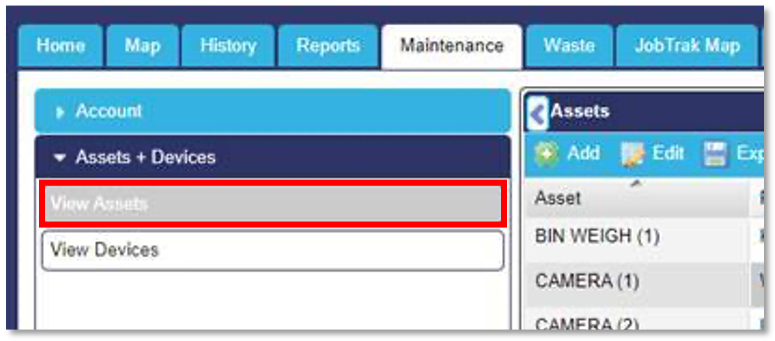
In order to change a vehicles circuit, log into your account as normal and select the ‘Maintenance’ page. Then select ‘Assets + Devices’ from the tabs on the left hand side of the screen and click onto 'view Assets'.
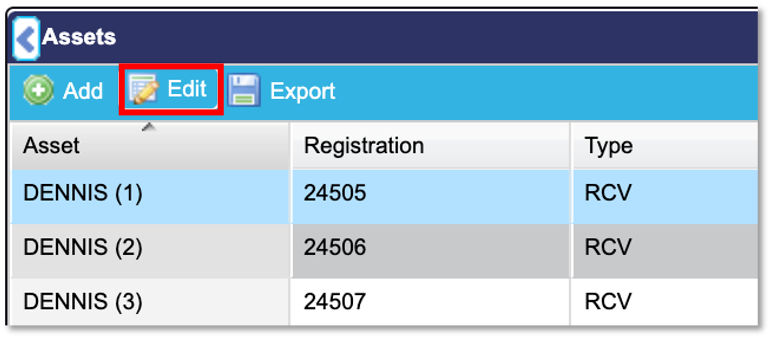
All assets should now be displayed. Select the asset you would like to make this change to (In the screen shots below we are going to make this change to the asset called ‘Dennis (1)’, you will know that the asset has been selected because it will be highlighted. Next you need to select the ‘Edit’ button shown in the screen shot below.
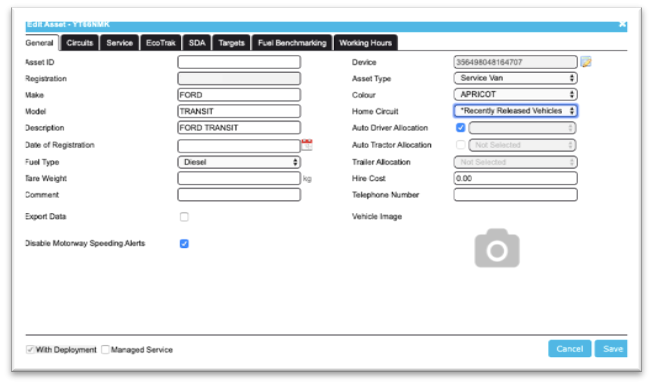
You will now see a pop-up box which will display further information about that asset. To change a vehicle’s circuit, select the drop-down list next to ‘Home Circuit’ and choose the required circuit. In the example below, the circuit is being changed from ‘Recently Released Vehicles’ to ‘Demo Circuit’.
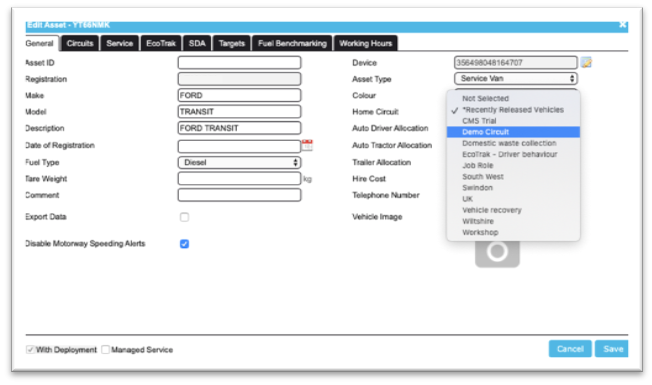
To finalise the circuit change, click the ‘Save’ button in the bottom right hand side of the window.